nf-core/provenancereport
A simple provenance reporting pipeline
Introduction
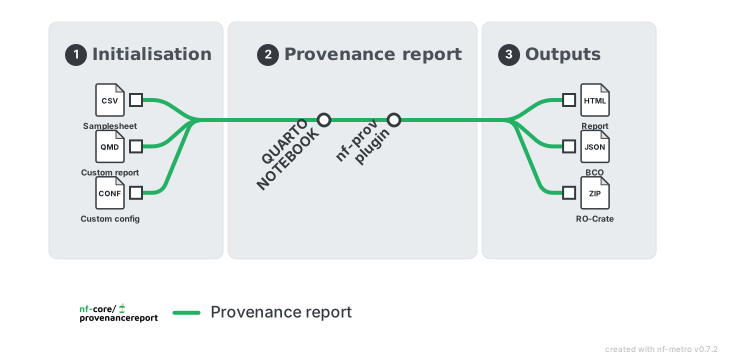
nf-core/provenancereport is a reporting pipeline that validates a samplesheet and renders reproducible Quarto reports. The samplesheet has two columns, id and path, where each row points to one input file. The pipeline stages all listed files into a single Quarto render and publishes the rendered report plus any generated artifacts.
Requirements
- Nextflow
25.10.4or later. - A supported execution environment such as Docker, Singularity, Apptainer, or Conda. Docker or Singularity is recommended for reproducibility.
- Read access to the samplesheet and every file it references, plus write access to
--outdir. - For a custom
--notebook, a configured report runtime containing Quarto and every language, package, and system dependency used by that notebook.
See the usage requirements for details.
The default workflow performs the following steps:
- Validate and normalise the input samplesheet with
nf-schema. - Resolve each
pathentry from the samplesheet as one input file. - Render one Quarto notebook with all listed files using the nf-core
quarto_notebookmodule. - Calculate MD5 checksums for every samplesheet input and the rendered Quarto HTML using the nf-core
md5summodule. - Run
REPORTENVIRONMENTin the resolved Quarto runtime to collect the R session, Python version, and container or Conda environment details. - If
--documentis provided, publish the review or sign-off document with the pipeline results. - Generate a MultiQC audit report containing the input samplesheet, file checksums, published outputs, run configuration, software versions, and runtime information.
- Generate BCO and Workflow Run RO-Crate provenance with the
nf-provplugin. - Publish the reports, artifacts, checksums, and standard Nextflow execution metadata.
Usage
If you are new to Nextflow and nf-core, please refer to this page on how to set-up Nextflow. Make sure to test your setup with -profile test before running the workflow on actual data.
First, prepare a samplesheet with your input data that looks as follows:
samplesheet.csv:
id,pathcounts,counts.tsvmetadata,metadata.tsvEach row represents exactly one input file. The id value is included in params$input_ids, and path must point to a single file.
Now, you can run the pipeline using:
nextflow run nf-core/provenancereport \ -profile <docker/singularity/.../institute> \ --input samplesheet.csv \ --outdir <OUTDIR>By default, the pipeline renders the bundled notebook in assets/provenance_report.qmd. To render your own custom Quarto notebook, provide --notebook custom_report.qmd.
Report inputs are staged into the Quarto render working directory by basename. Custom notebooks should read those staged filenames directly, for example readxl::read_xlsx("counts.xlsx"), and every file listed in the samplesheet must have a unique basename. See the usage documentation for details on designing custom reports.
Please provide pipeline parameters via the CLI or Nextflow -params-file option. Custom config files including those provided by the -c Nextflow option can be used to provide any configuration except for parameters; see docs.
For more details and further functionality, please refer to the usage documentation and the parameter documentation.
Pipeline output
A successful run produces:
quartonotebook/*.html: the rendered Quarto report, plus the source notebook and any report artifacts.md5sum/provenancereport.md5: checksums for every samplesheet input and the rendered report.multiqc/multiqc_report.html: an audit report covering inputs, checksums, outputs, parameters, software versions, and the report runtime.pipeline_info/manifest_<timestamp>.bco.jsonandro-crate-metadata_<timestamp>.json: BCO and Workflow Run RO-Crate provenance.pipeline_info/: Nextflow execution reports, trace, DAG, parameters, and collected software versions.- The original review or sign-off file at the results root when
--documentis provided.
For the complete directory layout and guidance on interpreting each file, see the output documentation.
Credits
nf-core/provenancereport was originally written by Alexander Peltzer, Gregor Sturm, Julian Schwab.
We thank the following people for their extensive assistance in the development of this pipeline:
Antonia Saracco, Delfina Terradas, Anabella Trigila.
Contributions and Support
If you would like to contribute to this pipeline, please see the contributing guidelines.
For further information or help, don’t hesitate to get in touch on the Slack #provenancereport channel (you can join with this invite).
Citations
Please cite the core reporting and provenance software used by the pipeline:
Quarto.
J.J. Allaire, Charles Teague, Carlos Scheidegger, Yihui Xie, Christophe Dervieux & Gordon Woodhull.
Computer software. https://quarto.org/.
nf-prov: Nextflow plugin to render provenance reports for pipeline runs.
Nextflow.
Computer software, version 1.7.0. nextflow-io/nf-prov.
An extensive list of references for the tools used by the pipeline can be found in the CITATIONS.md file.
You can cite the nf-core publication as follows:
The nf-core framework for community-curated bioinformatics pipelines.
Philip Ewels, Alexander Peltzer, Sven Fillinger, Harshil Patel, Johannes Alneberg, Andreas Wilm, Maxime Ulysse Garcia, Paolo Di Tommaso & Sven Nahnsen.
Nat Biotechnol. 2020 Feb 13. doi: 10.1038/s41587-020-0439-x.